
Handling rate limits comes down to three habits: read the rate limit headers the server sends you, back off with growing randomized delays, and keep your request volume low enough that you rarely trip the limit at all. Get those right and a scraper survives slow endpoints, shared IP quotas and flaky newsroom deadlines. Get them wrong and you lose a six-hour crawl to a 403 at hour five. This guide is updated for 2026 and works in any language, with Python and Node examples you can copy straight in.
The whole setup takes about 30 to 60 minutes for a working baseline. Making it production-ready — with durable checkpoints, alerting and a circuit breaker — takes longer, because most of that work is testing what happens when things go wrong.
Nothing here is about defeating a site’s defenses. It is about reading the signals a server already gives you and behaving like a well-mannered client. If a site has told you to slow down, the useful engineering question is how to slow down gracefully.
What You Need
You need five things before collection starts, and only two of them are libraries.
1. Confirmed permission to access the data. Check the terms of service, the robots.txt file, and any API documentation. If there is an official API with a documented quota, that quota is the contract. Scraping an HTML page that is explicitly off-limits is a different activity entirely, and no amount of backoff code changes that.
2. An HTTP client that exposes status codes and headers. Most clients do this by default. You need to be able to read response headers without swapping libraries, because Retry-After and the rate limit headers are the whole game.
3. Logging that records the signal, not the payload. For each request you want the endpoint, the timestamp, the status code, the rate limit headers, and the delay you chose. Never log full response bodies if they can contain personal data or API keys.
4. A cache. Any page you have already fetched should be served from disk rather than requested again. Caching is the cheapest way to reduce request volume, and it cuts repeated work after a crash.
5. A retry mechanism that supports exponential backoff with jitter. Most HTTP libraries have some version of this built in, but it is almost always off by default and often missing jitter. You will probably write about 30 lines yourself.
Before you tune any of it, it helps to know what the server is doing, because different algorithms punish different behaviors.
| Algorithm | How it counts | Burst behavior | What it means for a scraper |
|---|---|---|---|
| Fixed window | Counts requests inside a fixed block of time, such as the current minute | Allows a double burst across a window boundary | A steady rate can still spike twice at the edge; keep a margin |
| Sliding window | Counts requests over a rolling window using timestamps | Smooth, no boundary burst | Honest pacing works well here; bursts cost you twice |
| Token bucket | Tokens refill at a fixed rate, each request spends one | Allows a stored burst up to bucket size | Short bursts are fine while your long-run average stays low |
| Leaky bucket | Requests queue and drain at a constant rate | No burst at all | Concurrency must stay low; queueing just moves the problem |
The practical takeaway is simple. You do not need to know which one a site runs to behave well, but it explains why a scraper with a two-second delay can still get throttled: it may be sending twenty requests in the last second of a minute and twenty in the first second of the next.
Step-by-Step: How to Handle Rate Limits When Scraping
The sequence below runs in order. Each step depends on the one before it, and each one has a signal that tells you it worked.
Identify Rate-Limit Responses Before Retrying
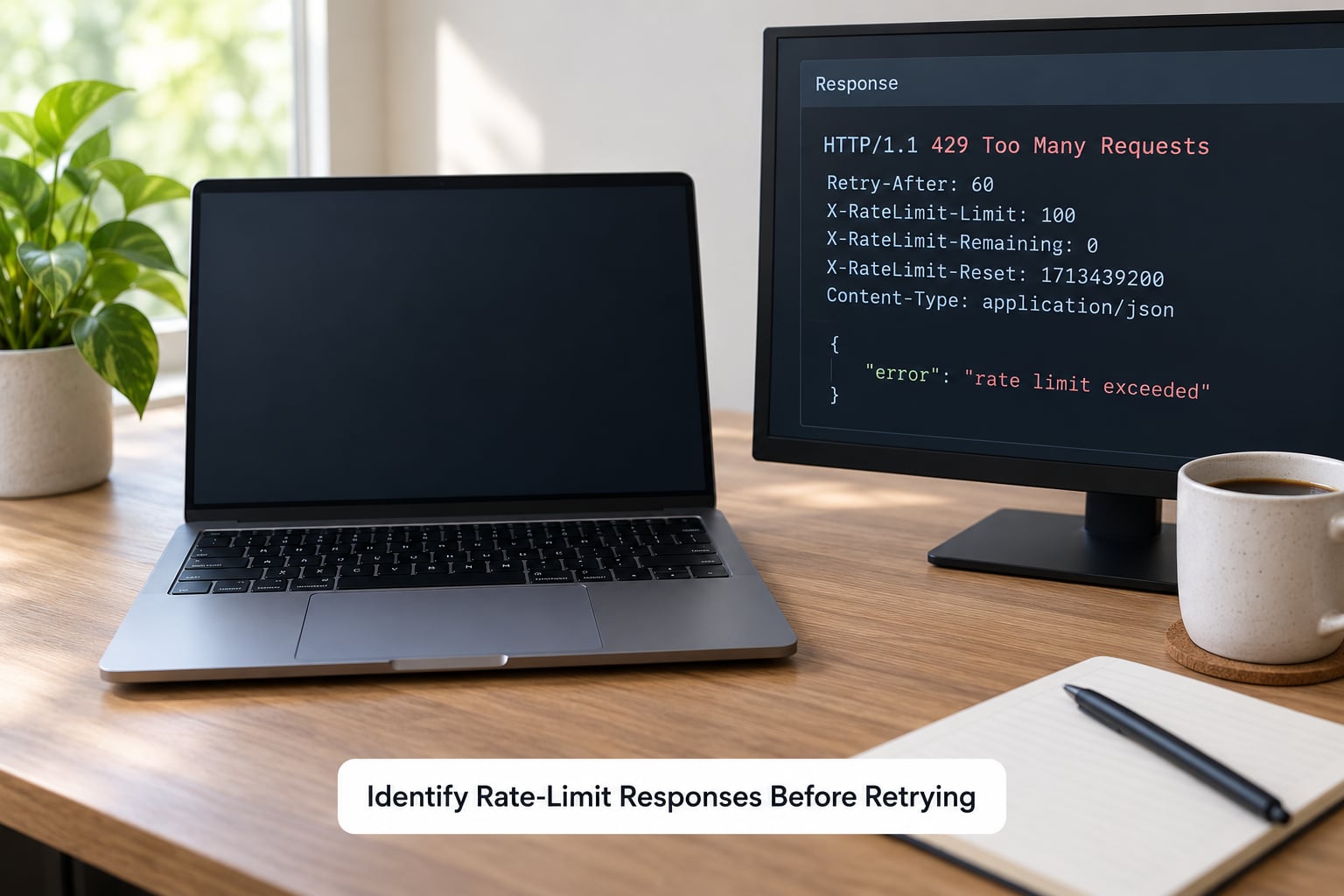
The first job is telling a throttle apart from a ban. They look similar in a log file and mean opposite things.
A 429 Too Many Requests is a throttle: temporary, reversible, and usually carrying instructions. A 403 Forbidden with a block page is often a denial. A 503 with a Retry-After is usually capacity, not your fault. A 401 is an expired credential, not a rate limit at all. Retrying any of those on a backoff loop wastes time and, on the 401, makes things slightly worse each pass.
Headers are where the useful detail lives:
- Retry-After — how long to wait, either as a number of seconds or as an HTTP date. This is the server telling you directly.
- X-RateLimit-Limit — the ceiling for your window.
- X-RateLimit-Remaining — requests left in the current window. This is the single most valuable header for pacing.
- X-RateLimit-Reset — when the window resets, as a timestamp or as seconds.
- RateLimit-Limit, RateLimit-Remaining, RateLimit-Reset — the newer IETF-style equivalents, sometimes split across several headers.
Headers do not always match status codes. Plenty of sites return 200 with a remaining count of zero, so a good collector reads the headers on successful responses too. A rising latency with no error is another soft signal that you are near a limit.
RETRYABLE = {429, 500, 502, 503, 504}

def inspect(response):
    h = response.headers
    signal = {
        "url": response.url.split("?")[0],
        "status": response.status_code,
        "retry_after": h.get("Retry-After"),
        "limit": h.get("X-RateLimit-Limit") or h.get("RateLimit-Limit"),
        "remaining": h.get("X-RateLimit-Remaining") or h.get("RateLimit-Remaining"),
        "reset": h.get("X-RateLimit-Reset") or h.get("RateLimit-Reset"),
    }
    # Log the signal only. Never log cookies or authorization headers.
    log.info(json.dumps(signal))
    return signal
You know it worked when your log shows a status, a delay decision and a remaining count for every request, and you can reconstruct why any single request waited what it waited.
Set a Conservative Request Budget
Instead of picking a delay and hoping, work from a documented limit. Suppose an API documents 60 requests per minute and you hold one API key. Take half the budget for steady requests and reserve the rest for retries and your own tooling. That gives you a safe ceiling of about 30 requests per minute, or one request every two seconds.
If the documentation is vague, start far lower than you think you need. Small sites and hobby projects have almost no spare capacity, while large sites with a CDN in front can absorb considerably more. When in doubt, the smaller site gets the slower rate.
# Budget math, made explicit
documented_rps = 1.0        # 60 requests / minute
safety_margin = 0.5         # use half of what is documented
workers = 4

safe_rps = documented_rps * safety_margin        # 0.5 requests/second
per_worker_rps = safe_rps / workers              # 0.125 requests/second
delay_seconds = 1 / per_worker_rps               # 8 seconds between calls per worker
Concurrency is a multiplier, not a free win. Four workers each pausing one second apart still produce four requests a second. Divide the budget across workers before you add any of them.
If you want a shared budget across several processes or machines, the same math lives in a shared store — a Redis-backed token bucket, for example — so the budget is global rather than per worker. That single change removes most surprise 429s in a multi-process crawl.
You know it worked when a 100-request test run stays under a 1% 429 rate and the median gap between your outgoing requests matches your calculated delay.
Use Exponential Backoff with Jitter
When a limit is hit, the response is to wait longer than you planned, and to wait slightly differently each time. Exponential backoff raises the delay after each failed attempt: roughly 2, 4, 8, 16, 32 seconds. Jitter adds randomness so several workers do not wake up together and collide again.
Backoff is not a substitute for a lower request rate. A client that runs at ten times the allowed rate will be backing off continuously and will still get blocked.
import time, random

def parse_retry_after(value):
    if not value:
        return None
    if value.isdigit():
        return int(value)
    # HTTP-date form: parse it and convert to seconds from now
    from email.utils import parsedate_to_datetime
    from datetime import datetime, timezone
    when = parsedate_to_datetime(value)
    if when.tzinfo is None:
        when = when.replace(tzinfo=timezone.utc)
    return max(0, int((when - datetime.now(timezone.utc)).total_seconds()))

def backoff_delay(attempt, retry_after=None):
    server_hint = parse_retry_after(retry_after)
    if server_hint is not None:
        return server_hint            # the server knows better than we do
    base = min(2 ** attempt, 60)      # cap the ceiling at 60 seconds
    return random.uniform(0.5 * base, base)   # full jitter
Two rules make this reliable. Cap total attempts — six is usually plenty — and give up with an alert rather than looping forever. And when Retry-After is present, obey it even if it is longer than your own calculation.
The same logic in Node:
function backoffDelay(attempt, retryAfter) {
  if (retryAfter) {
    const seconds = Number(retryAfter);
    if (!Number.isNaN(seconds)) return seconds * 1000;
    return Math.max(0, new Date(retryAfter).getTime() - Date.now());
  }
  const base = Math.min(Math.pow(2, attempt) * 1000, 60000);
  return Math.random() * base;
}
You know it worked when the 429 rate climbs during a throttle, every client backs off for roughly the requested delay, and requests succeed again without any manual intervention.
Stop Concurrent Requests When Limits Tighten
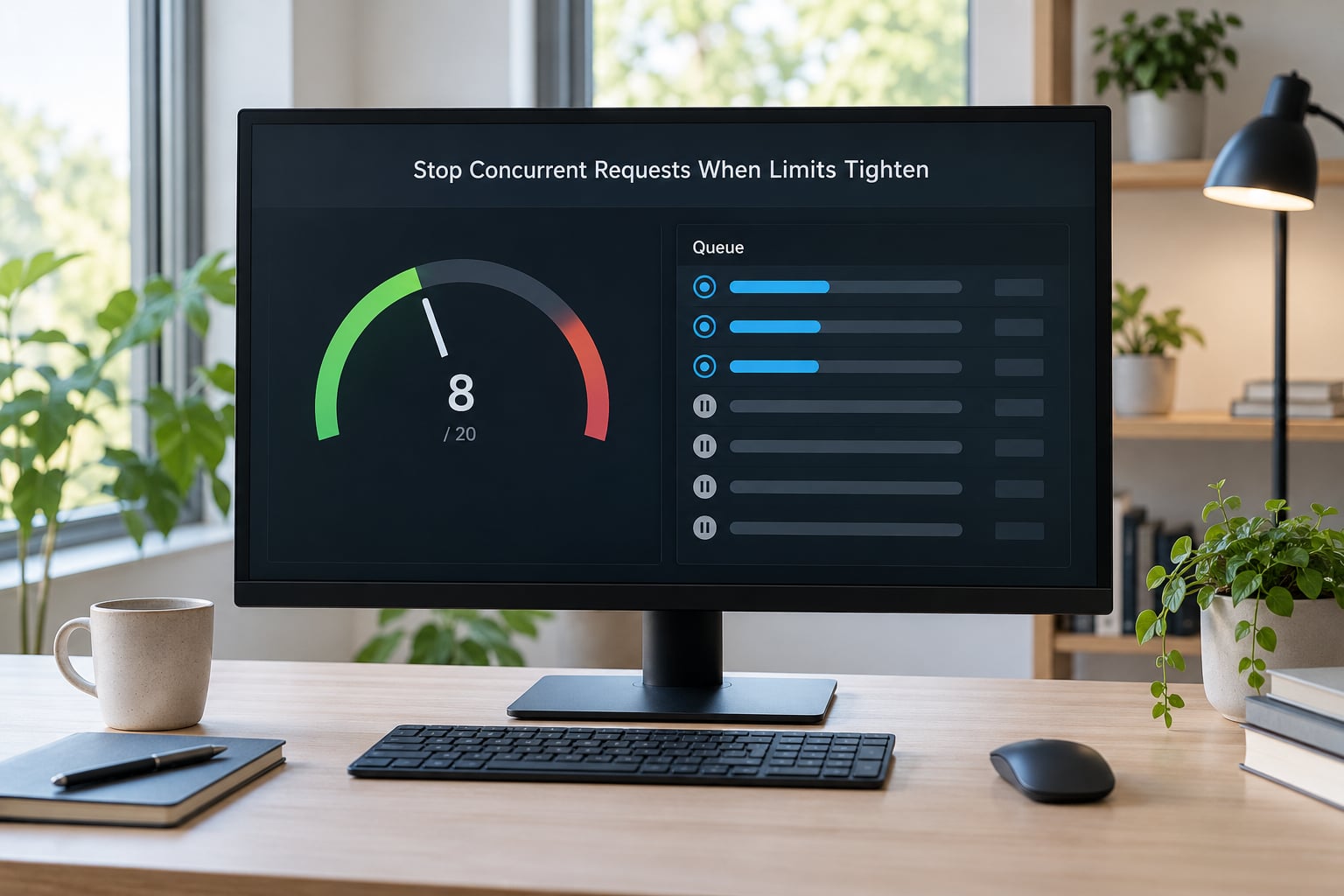
Backoff protects a single request. It does not protect a pool of workers, which is where most self-inflicted bans happen: every worker hits the same wall at the same second, and the retry storm looks like an attack.
Use the remaining count as a throttle signal before you ever see a 429. When X-RateLimit-Remaining drops below a set fraction of the limit, shed workers. Pause everything on repeated 429s, wait out the window, then restore concurrency gradually and let a successful window confirm the site is healthy again.
class ConcurrencyGovernor:
    def __init__(self, max_workers):
        self.max_workers = max_workers
        self.active = max_workers

    def update(self, status, remaining, limit):
        if status == 429:
            self.active = 0                       # full stop, not a slowdown
        elif limit and remaining is not None:
            if remaining < limit * 0.2:
                self.active = max(1, self.max_workers // 2)
            elif remaining < limit * 0.05:
                self.active = 1
            elif self.active < self.max_workers and status == 200:
                self.active = min(self.max_workers, self.active + 1)
Stepping back up one worker at a time, after a clean window, matters. Restoring all sixteen at once recreates the original burst.
In Scrapy the same idea has a name: AUTOTHROTTLE_ENABLED with AUTOTHROTTLE_START_DELAY, AUTOTHROTTLE_MAX_DELAY and AUTOTHROTTLE_TARGET_CONCURRENCY. It watches response latency and adjusts delays on its own, which saves you writing the governor — though you should still keep CONCURRENT_REQUESTS_PER_DOMAIN low, because AutoThrottle reacts to slowdown rather than preventing it.
One recurring surprise: AutoThrottle and a large DOWNLOAD_DELAY can conflict, since each tries to control pace. Pick one as the base rate and let the other adjust around it.
You know it worked when a deliberate stress test shows worker count dropping on 429 and recovering gradually, with no spike in request rate at recovery time.
Cache Results and Resume from Checkpoints
Most rate limit pain comes from re-requesting things you already have. Three mechanisms cut request volume without touching anyone’s controls.
Conditional requests. Store the ETag or Last-Modified value you got last time and send it back as If-None-Match or If-Modified-Since. A 304 response tells you nothing changed, and many servers treat it as a cheap request. It is still a request against the quota, so it does not replace pacing.
Local response cache. Key by URL and store the body plus the rate limit headers. Before any request, check the cache. For newsroom work where the same article is revisited across runs, this alone removes a large share of traffic.
Durable checkpoints. After each completed unit of work — an article, a page, a company record — write a line to disk recording the unit identifier, the output location and the timestamp. When a run dies mid-crawl, it resumes from the last checkpoint rather than from zero.
def collect(unit_id, client):
    cached = cache.get(unit_id)
    if cached:
        return cached                      # zero requests spent

    data = client.fetch_with_backoff(unit_id)

    cache.put(unit_id, data)
    checkpoint.write({
        "unit": unit_id,
        "stored_at": data["fetched_at"],
        "file": data["output_path"],
    })
    return data
Write the checkpoint after the data lands, not before. An optimistic checkpoint written first means a crash leaves you with a record of work that was never done, which is the worst possible failure mode for a resumed crawl.
You know it worked when you can kill a run at any point, restart it, and see it continue at the same place with no duplicate output files.
Add Monitoring and a Failure Circuit Breaker
A scraper that fails quietly at 3am is a scraper that fails. Track a small set of metrics and alert on them.
- Request volume — requests per second, split by host.
- Success rate — share of requests returning 2xx.
- 429 rate — throttled requests as a share of the total.
- Median retry delay — a rising median means the site is pushing back harder.
- Queue depth — units waiting versus units completed.
- Collection progress — completed units against the plan.
The metric that tells the story is the 429 rate over a rolling window. A brief spike during a throttle is normal; a sustained rate above a few percent means your budget is wrong, not your retry logic.
A circuit breaker sits above those metrics. When the failure rate crosses a threshold — repeated 429s, a run of timeouts, or 403s that never clear — it opens and stops all outbound traffic for a set period. After the open window, one probe request goes out. A successful probe closes the circuit and traffic resumes at half capacity before ramping back to normal. A failed probe reopens it.
def should_open(win_rate_429, consecutive_403, last_success_age):
    if consecutive_403 >= 5:                    return True
    if win_rate_429 > 0.25:                     return True
    if last_success_age > 900:                  return True   # 15 minutes
    return False
This is the component that distinguishes a scraper from a denial-of-service tool. It proves the client can recognize when it is hurting someone and stand down.
You know it worked when deliberately breaking the collector opens the circuit, halts traffic, and restores it gradually after a clean probe.
Common Mistakes
Retrying immediately after a 429. The server just told you the answer. An immediate retry usually returns another 429 and deepens the penalty window.
Using one fixed low delay. A flat 0.5-second pause across sixteen workers is sixteen workers firing in bursts. Use per-worker delays and let jitter spread the load.
Ignoring Retry-After. When the server provides a delay, your own calculation should not shorten it.
Rotating proxies to evade limits. Changing IPs to stay above a limit you have already been told to stay below is not throttling. If a site’s quota is per IP, switching addresses spreads load rather than reducing it, and it can look like deliberate evasion.
Retrying permanent failures. A 400, 401 or 404 will not fix itself. Back off only on 429 and temporary 5xx responses, or you burn your attempt budget on requests that cannot succeed.
Duplicating work after a restart. Without checkpoints, every crash costs a full re-crawl — which is also a full re-crawl of requests against someone else’s server.
Ramping concurrency too fast on recovery. Restoring every worker the moment one request succeeds recreates the burst that caused the problem.
Trusting free proxy lists. They tend to be already flagged by the security vendors whose limits you are trying to stay under, so they add cost without adding reach.
A short operational checklist: confirm permission before the first request, measure the real limit with a 100-request test rather than guessing, keep retries capped and jittered, log the signal on every request, and escalate to the site owner when a restriction is unclear. A polite request for an API key or a documented feed usually solves the problem faster than any amount of evasion.
Frequently Asked Questions
Is a 429 response always a permanent rate limit?
No. A 429 is a throttle, not a ban: it means you sent more requests than the server allows right now, and it clears once the window resets or your quota refills. Read the Retry-After header to learn how long. A permanent block usually looks different, such as a 403 with a block page, a CAPTCHA interstitial, or an explicit denial message. If 429s continue long after the stated window with no recovery, the limit is probably tied to your IP, session or API key rather than to timing, and the fix is to lower your request rate rather than retry harder.
Should I retry immediately after receiving HTTP 429?
No. An immediate retry almost always returns another 429 and can extend the penalty window. Wait for the period in the Retry-After header if the server sent one. Without that header, use exponential backoff with jitter, roughly 2, then 4, 8 and 16 seconds, capped at around 60 seconds. Cap total attempts at about six and alert rather than looping forever. Also reduce your base request rate, because backoff layered on top of a rate that is too high just means continuous throttling.
What is the best delay between scraping requests?
There is no universal number, so derive it from the documented limit and reserve headroom. If an API allows 60 requests per minute, a safe steady rate is roughly one every two seconds after reserving half the budget for retries. Then divide that budget across your workers rather than giving each one the full rate. Small sites and hobby projects need considerably more caution than large ones behind a CDN. Test with about 100 requests, watch the 429 rate, and adjust until you stay under one percent.
How do I calculate requests per second without exceeding an API limit?
Take the documented requests per window and divide by the seconds in that window to get the ceiling. Then multiply by a safety margin of roughly 0.5, since retries, your own tooling and other clients share the same quota. Divide that safe rate across concurrent workers to get each worker’s rate, and invert it to get a delay in seconds. With several processes or machines, keep the budget in shared storage such as a Redis-backed token bucket so the limit is enforced globally instead of once per worker.
Should I use rotating proxies or IP addresses for scraping?
Not as a way around a limit you have already been told about. If a quota is per IP, rotating addresses spreads your load across someone else’s quota rather than reducing it, and it can read as deliberate evasion. Rotating residential IPs do help with geo-specific content and with distributing genuinely large jobs across regions, which is a legitimate use. Keep requests per host low, obey robots.txt crawl-delay, honor Retry-After, and if the site offers an API or a data request, asking for access is faster than any rotation setup.
Start with three things. Confirm you have permission to collect the data, then measure the site’s real limit with a hundred-request test instead of assuming it. From there, implement capped exponential backoff with jitter, log every rate limit signal, and only scale concurrency once a run completes with a 429 rate under one percent. That sequence gets you a collector that finishes its jobs instead of quietly dying halfway through.